End-to-End Recruitment Software Built for Social Care
From vacancy to verified start with every compliance check tracked in one place.
From vacancy to verified start with every compliance check tracked in one place.
From vacancy to verified start with every compliance check tracked in one place.
CarePoint365 Recruitment manages the full hiring journey for care providers - posting vacancies, collecting applications, tracking DBS, Right to Work, and references, and moving candidates through to a compliant, documented start. Built for the realities of regulated care, not generic hiring. Running residential or nursing homes? See our care home recruitment software. Recruiting for home care? See our recruitment software for domiciliary care. See our care recruitment software pricing.
CarePoint365 Recruitment manages the full hiring journey for care providers - posting vacancies, collecting applications, tracking DBS, Right to Work, and references, and moving candidates through to a compliant, documented start. Built for the realities of regulated care, not generic hiring. Running residential or nursing homes? See our care home recruitment software. Recruiting for home care? See our recruitment software for domiciliary care. See our care recruitment software pricing.
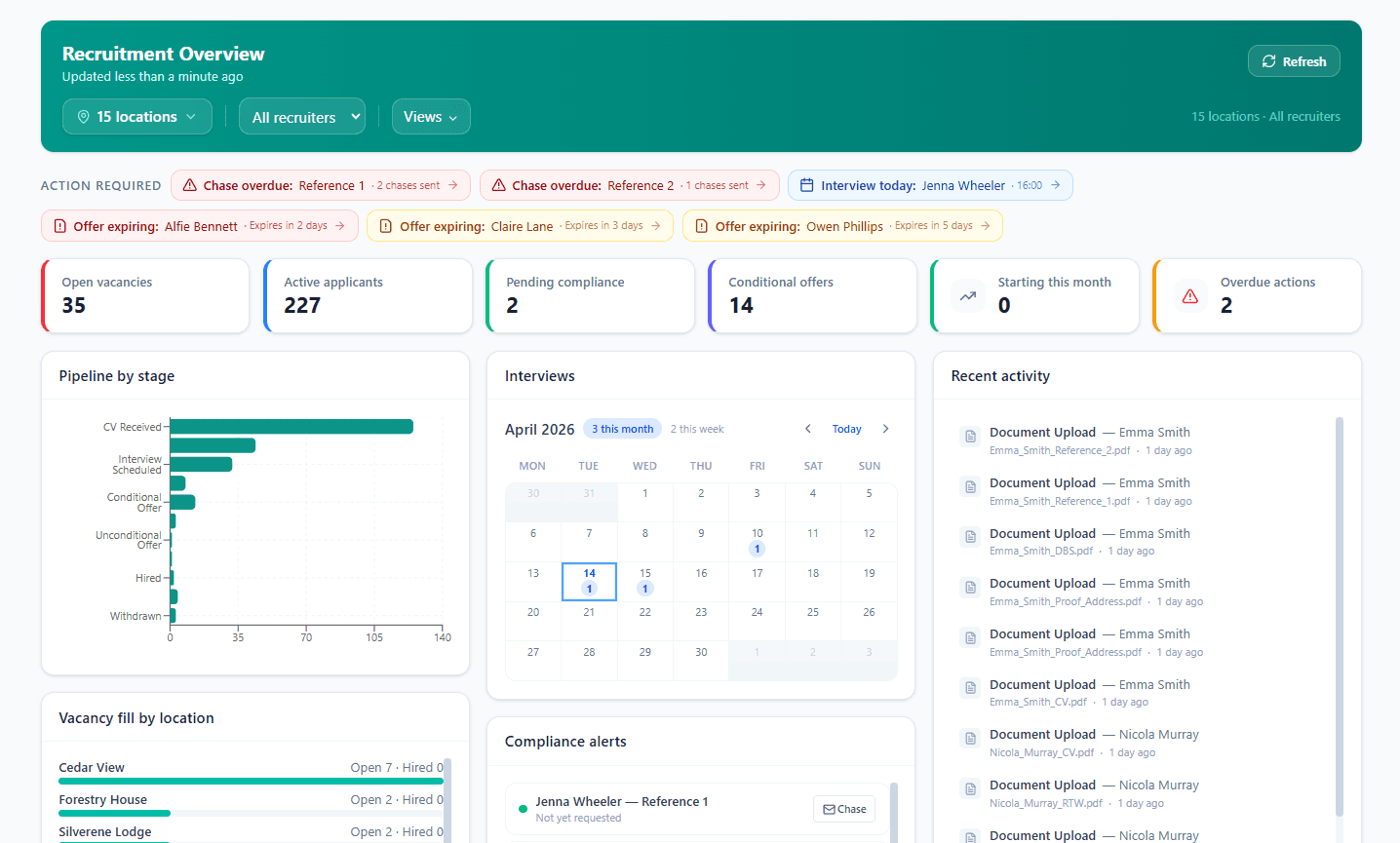
Compliance checks tied to the role
Compliance checks tied to the role
Compliance checks tied to the role
Compliance checks tied to the role
DBS, Right to Work, references, training status, all gated with clear ownership before the candidate starts their shift.
DBS, Right to Work, references, training status, all gated with clear ownership before the candidate starts their shift.
Document collection & shortlists in one place
Document collection & shortlists in one place
Document collection & shortlists in one place
Document collection & shortlists in one place
Candidates get access to a portal to upload documentation which are verified and evaluated using AI.
Candidates get access to a portal to upload documentation which are verified and evaluated using AI.
Recruitment pipeline visibility and alerts
Recruitment pipeline visibility and alerts
Recruitment pipeline visibility and alerts
Recruitment pipeline visibility and alerts
Stay on top of recruitment bottlenecks and keep things moving forward so you don't lose candidates.
Stay on top of recruitment bottlenecks and keep things moving forward so you don't lose candidates.
How It Works
How It Works
How It Works
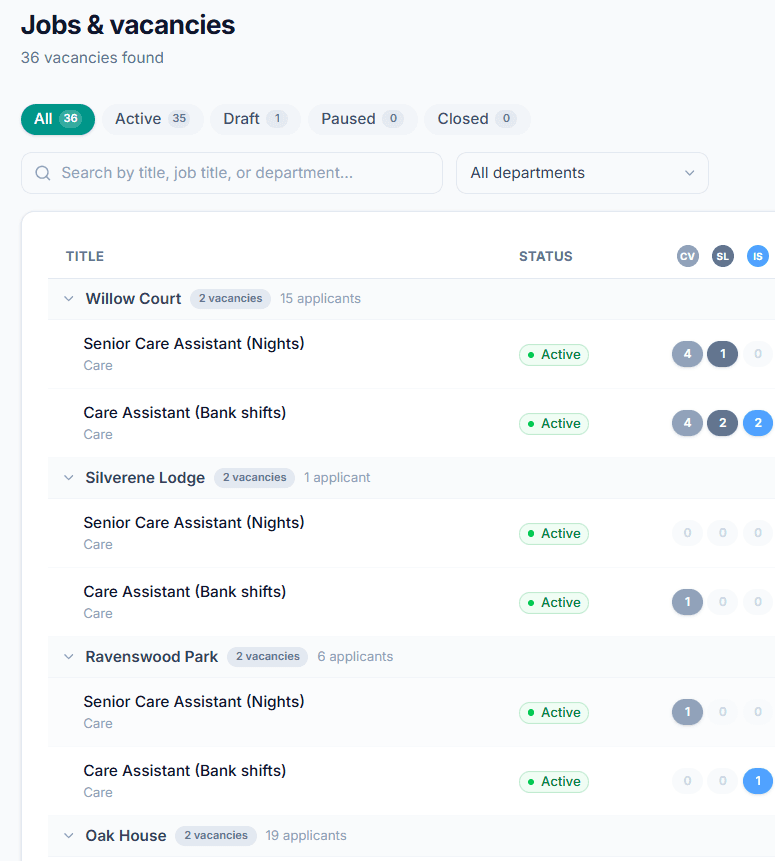
1) Post a care related vacancy
1) Post a care related vacancy
1) Post a care related vacancy
1) Post a care related vacancy
Create a vacancy with role-specific compliance requirements. Publish to an online job board or the careers page of your website.
Create a vacancy with role-specific compliance requirements. Publish to an online job board or the careers page of your website.
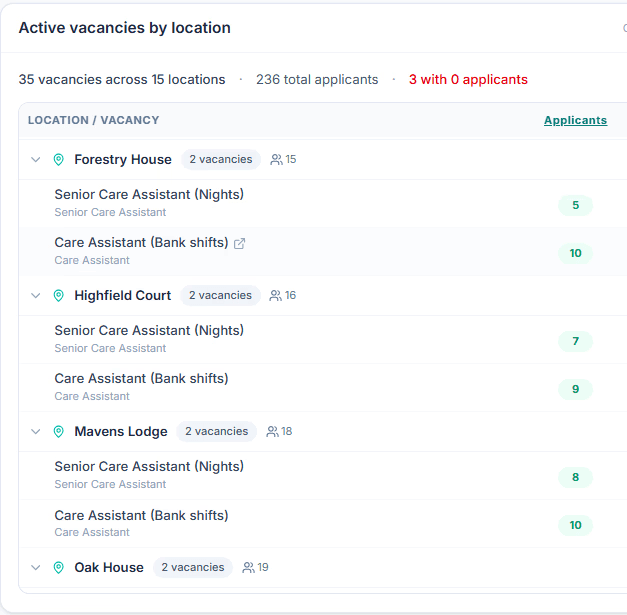
2) Collect applications from care staff
2) Collect applications from care staff
2) Collect applications from care staff
2) Collect applications from care staff
Candidates can apply through job boards like Indeed or via your own web form. Applications are filled in automatically by our AI agent
Candidates can apply through job boards like Indeed or via your own web form. Applications are filled in automatically by our AI agent
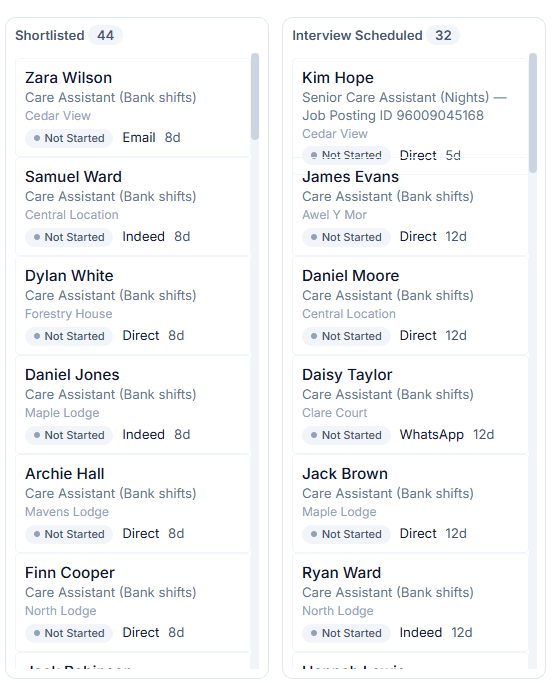
3) Shortlist & Interview
3) Shortlist & Interview
3) Shortlist & Interview
3) Shortlist & Interview
Move candidates through a structured gated pipeline. Schedule interviews with integration to Outlook and MS Teams. Record outcomes and track progress.
Move candidates through a structured gated pipeline. Schedule interviews with integration to Outlook and MS Teams. Record outcomes and track progress.
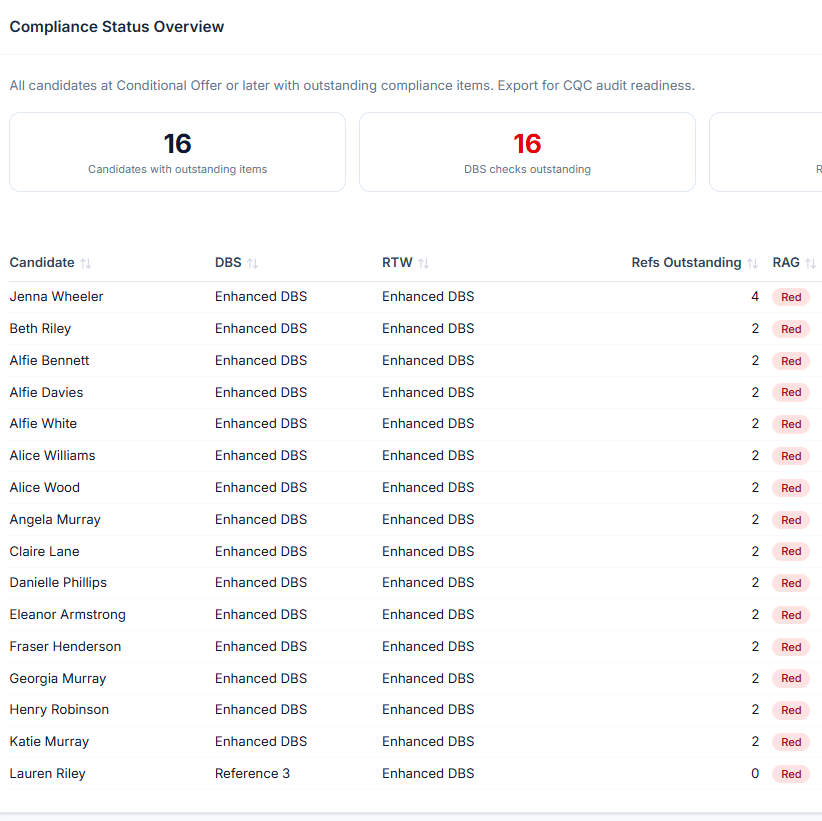
4) Track care compliance checks
4) Track care compliance checks
4) Track care compliance checks
4) Track care compliance checks
Manage and track compliance checks for DBS, Right to Work, references, sponsored worker status. Use agentic AI to track and alert.
Manage and track compliance checks for DBS, Right to Work, references, sponsored worker status. Use agentic AI to track and alert.
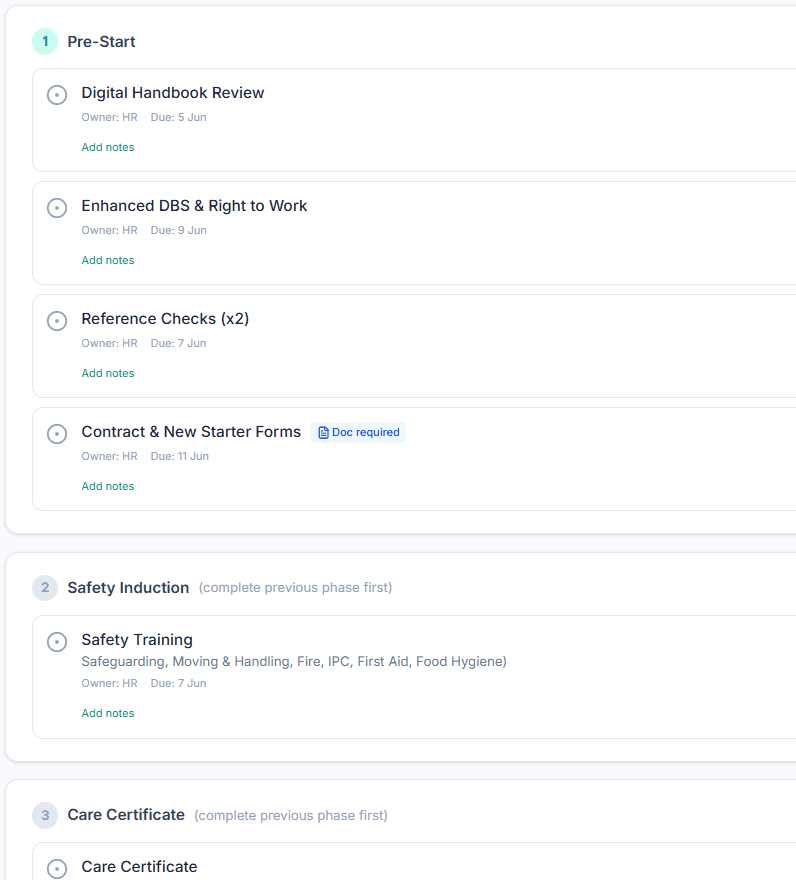
5) Issue offer and onboard
5) Issue offer and onboard
5) Issue offer and onboard
5) Issue offer and onboard
Generate offer letters once all mandatory checks are complete. Onboarding tasks are automatically created based on the role and compliance needs.
Generate offer letters once all mandatory checks are complete. Onboarding tasks are automatically created based on the role and compliance needs.
Care Staff Recruitment Compliance
Ensuring Safe recruitment, evidence end to end
Ensuring Safe recruitment, evidence end to end
Ensuring Safe recruitment, evidence end to end
Care providers have a legal and regulatory duty to verify every hire before they start. CarePoint365 Recruitment ATS tracks every required check by role with status, dates, and a decision record that supports CQC inspection and internal governance.
Care providers have a legal and regulatory duty to verify every hire before they start. CarePoint365 Recruitment ATS tracks every required check by role with status, dates, and a decision record that supports CQC inspection and internal governance.
Enhanced DBS
Enhanced DBS
DBS Barred List
DBS Barred List
Right To Work
Right To Work
References
References
Who is it for?
Designed for everyone involved in care hiring
Designed for everyone involved in care hiring
Designed for everyone involved in care hiring
Recruitment Admins
Recruitment Admins
Recruitment Admins
Recruitment Admins
One place to manage every candidate and chase every check.
One place to manage every candidate and chase every check.
HR Managers
HR Managers
HR Managers
HR Managers
Compliance status across all sites, with escalation built in.
Compliance status across all sites, with escalation built in.
Home Managers
Home Managers
Home Managers
Home Managers
See and manage the recruitment pipeline without endless emails.
See and manage the recruitment pipeline without endless emails.
Regional Leads
Regional Leads
Regional Leads
Regional Leads
Cross-site hiring and compliance for care homes and branches.
Cross-site hiring and compliance for care homes and branches.
Frequently Asked Questions
Frequently Asked Questions
Frequently Asked Questions
Does it track DBS checks automatically?
Is it suitable for multi-site care groups?
Is it suitable for multi-site care groups?
How does it support CQC, Care Inspectorate and CIW recruitment requirements?
Can candidates apply directly from an advert?
Does it integrate with Microsoft 365 and HR modules?
Does it integrate with Microsoft 365 and HR modules?
What compliance checks does it cover?
Book a demo
See Carepoint365
in Action
See Carepoint365
in Action